


 Home /
 Laptop with Replaceable Battery: 2026 Buyer’s Guide, Market Trends, and Best Options


Table of Contents
- Why Laptops with Replaceable Batteries Matter Again
- Market Overview: Are Replaceable Laptop Batteries Disappearing?
- Key Vendor and Industry Trends (2024–2025)
- Core Buying Criteria for a Laptop with Replaceable Battery
- Use Cases: Who Benefits Most from Replaceable-Battery Laptops?
- How to Evaluate a Specific Laptop Model for Battery Replaceability
- Practical Tips for Using and Maintaining a Replaceable Battery Laptop
- FAQs About Laptops with Replaceable Batteries
- How to Choose the Right Laptop with Replaceable Battery for Your Needs
- Visualizing a Modern Laptop with Replaceable Battery
- Conclusion: Replaceable-Battery Laptops as a Strategic Choice
Why Laptops with Replaceable Batteries Matter Again
For years, the mainstream laptop market moved toward sealed batteries to achieve thinner designs and lower manufacturing costs. Today, several trends are pushing users back toward replaceable or easily serviceable batteries.
Organizations and individuals want laptops that last 5+ years, not 2–3. Governments, enterprises, and consumers increasingly value repairability over throwaway devices. Workers in remote locations or the field can carry a spare battery instead of hunting for outlets. Replacing a worn battery is cheaper than replacing the entire laptop.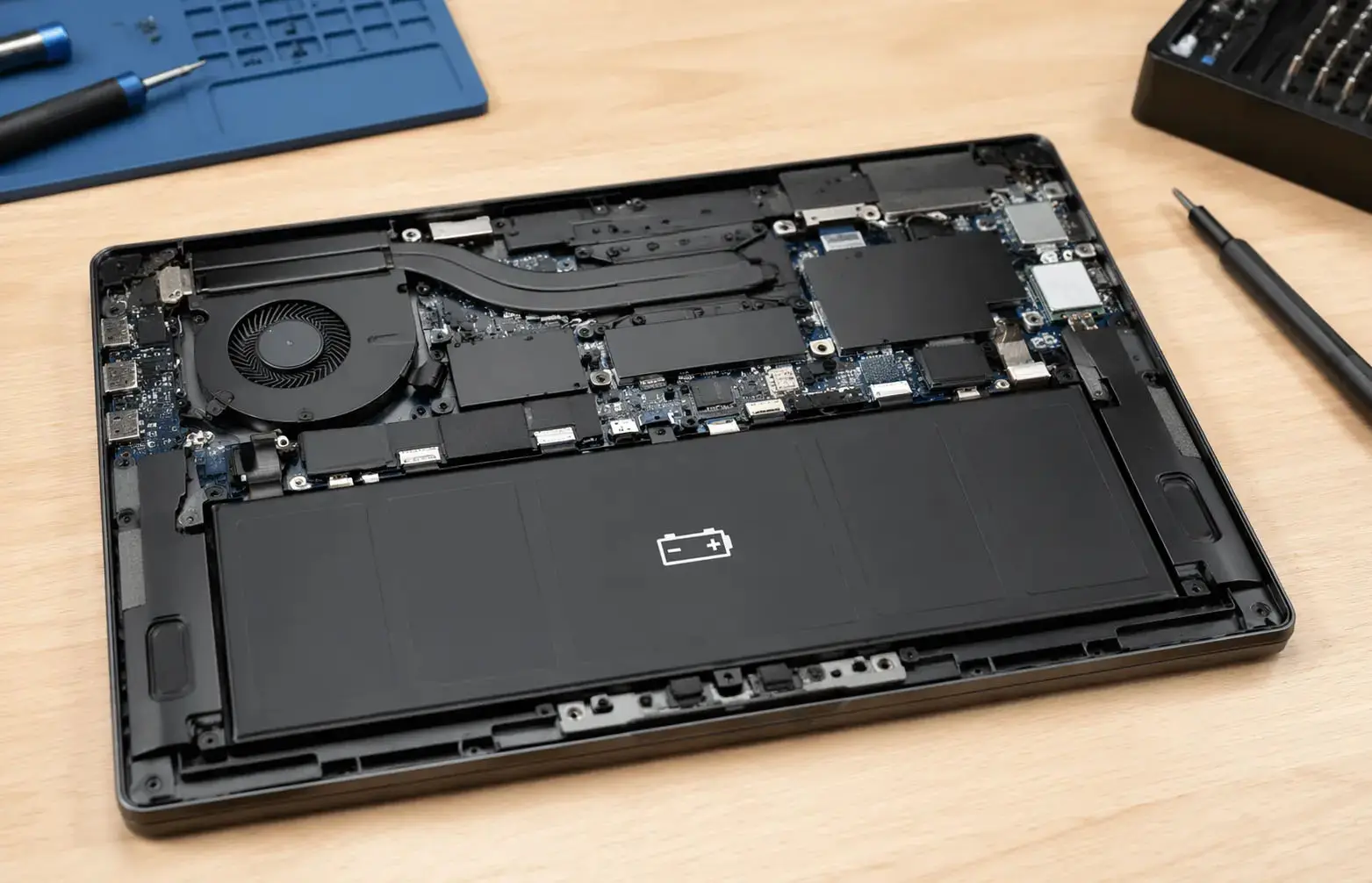
People searching for "laptop with replaceable battery" typically fall into one of these groups: IT decision-makers designing hardware standards, mobile professionals and field service workers, power users and travelers, or sustainability-focused buyers looking for repairable laptops.
Market Overview: Are Replaceable Laptop Batteries Disappearing?
From Fully Removable to "Easily Serviceable"
Many business and consumer laptops once had fully removable batteries. Around the mid-2010s, most consumer models transitioned to internal, non-user-removable batteries.
In 2023–2025, a new pattern has emerged. Classic hot-swappable batteries are now mainly in rugged and specialized business devices. Tool-less or low-tool battery replacement is reappearing in some business, education, and modular laptops. Modular laptops prioritize long-term repairability, making batteries one of the easiest parts to replace.
When evaluating a laptop with replaceable battery today, distinguish between these options:
Hot-swappable / external battery: Can be removed without opening the chassis; the laptop may even stay on.
Field-replaceable internal battery: Requires opening the bottom cover, but designed for straightforward replacement.
Sealed / difficult-to-replace: Replacement is technically possible but discouraged or requires extensive disassembly.
Key Vendor and Industry Trends (2024–2025)
Model availability varies by region and year; always confirm current specifications with the manufacturer or reseller.
1. Business and Enterprise Laptops: Partial Return to Serviceability
Major PC makers continue to maintain at least some business-class lines with serviceable batteries.
Dell Latitude / Precision (select models): Business lines often feature batteries that can be replaced by removing the bottom cover. Dell typically provides service manuals and offers official replacement packs via corporate channels.
HP EliteBook / ProBook / ZBook: Business and workstation lines tend to support battery replacement with basic tools, aligning with corporate lifecycle requirements and service contracts.
Lenovo ThinkPad series: Some ThinkPads have internal batteries that are relatively easy to replace, and some models still offer more modular designs than consumer Ideapad lines.
Truly externally removable batteries with a latch are far less common than they were a decade ago. Most current devices are serviceable but internal.
2. Rugged and Field Laptops: Hot-Swappable Batteries Still Common
Rugged laptops and 2-in-1s aimed at field workers frequently emphasize hot-swappable batteries. Many support dual battery bays, allowing you to swap one pack while the system runs on the other. These devices target environments where charging opportunities are limited and battery access must be quick.
If your search for a laptop with replaceable battery is driven by field-use requirements, rugged models are often the most capable, though typically more expensive and heavier than standard business laptops.
3. Modular and Repairable Laptops: The Sustainability Angle
A growing category is modular, repairability-focused laptops designed around easy battery replacement, user-replaceable storage and memory, repairable ports and I/O modules, and availability of spare parts and guides.
For sustainability-driven buyers and organizations with strong ESG targets, modular systems offer extended usable life through component upgrades, reduced e-waste by replacing parts instead of whole devices, and lower long-term costs in high-volume deployments.
Modularity is one of the strongest current trends supporting user-replaceable batteries.
4. Policy and Regulation: Right-to-Repair Momentum
In various regions, legislation and policy discussions around right-to-repair and product durability are ongoing. The direction of travel favors longer minimum support periods, availability of spare parts and documentation, and designs that avoid completely sealed, non-serviceable batteries when practical.
This regulatory pressure is contributing to renewed interest in more serviceable laptop designs.
Core Buying Criteria for a Laptop with Replaceable Battery
When choosing a laptop with a replaceable battery, focus on more than just the existence of a removable pack.
1. Battery Accessibility and Replacement Process
Ask yourself: Is the battery external or internal? External is typically fastest to swap, best for hot-swap scenarios. Internal but accessible is acceptable for most users if only swapped every 2–4 years.
Can you access the battery with a standard screwdriver, or is specialized tooling required? Does the manufacturer explicitly document battery replacement and offer official spare parts?
For most users, a field-replaceable internal battery is sufficient, as long as the process is well documented and does not void warranty when performed correctly.
2. Battery Capacity, Life, and Hot-Swap Support
Battery specs still matter. Watt-hours (Wh) indicate capacity; higher Wh usually means longer runtimes, assuming similar components. Some rugged and specialty models offer dual packs.
If your priority is extended runtimes rather than pure serviceability, prioritize a larger primary battery (e.g., 60–90 Wh where feasible), an option for a second battery bay or secondary slice battery if available, and support for fast charging when near power.
3. Performance and Portability Trade-offs
Laptops with replaceable or easily serviceable batteries tend to lean toward slightly thicker chassis and business, workstation, or rugged segments rather than ultra-thin consumer designs.
Balance your priorities. If mobility and light weight are critical, modular laptops with carefully optimized designs may work. If durability and runtime matter more, business or rugged models with larger batteries may be preferable.
4. Lifecycle, Warranty, and TCO
Especially for businesses, the value of a replaceable-battery laptop is deeply linked to lifecycle planning. Does battery replacement done by authorized service preserve your coverage? Are multi-year battery replacements included or discounted via extended warranties? Are batteries typically available for 5 or more years after product launch?
A laptop that costs slightly more upfront but supports inexpensive battery replacements can produce significant savings over a 5–7-year deployment.
Use Cases: Who Benefits Most from Replaceable-Battery Laptops?
1. Corporate and IT-Managed Environments
Enterprises and mid-sized organizations with managed fleets prioritize standardized hardware platforms, predictable maintenance and refresh cycles, and reduced downtime and support overhead.
For them, laptops with replaceable batteries offer straightforward mid-life refresh by swapping batteries around year 3–4, flexibility to extend usage of select units beyond planned refresh schedules, and better alignment with sustainability and device-recycling strategies.
IT departments often prefer business-class lines from major vendors, where service manuals are available, spare parts are stocked, and on-site or next-business-day service can be contracted.
2. Field Technicians, First Responders, and Industrial Users
Field users working in energy, utilities, logistics, public safety, and construction often require rugged hardware capable of surviving drops, vibration, and weather extremes, long usage hours per shift, and the ability to swap batteries on the go.
For this group, laptops with a hot-swappable or dual-battery system are often crucial. These devices might be heavier, but they dramatically reduce the risk of power loss in critical situations.
3. Travelers and Digital Nomads
People who spend long periods away from reliable power care about all-day battery life, the option to pack a spare battery for long journeys, and reasonable weight and size for travel.
Modular or business-class laptops with user-replaceable internal batteries can be a good balance, especially if combined with USB-C charging and compact power adapters.
4. Sustainability-First Consumers and Organizations
For buyers focused on reduced e-waste and longer device lifespans, replaceable batteries are a central requirement. They support reduced environmental impact by keeping the chassis and non-degrading components in service longer, upgradability through battery replacements combined with storage and memory upgrades, and alignment with ESG and CSR targets in organizations reporting on sustainability metrics.
These buyers often look for modular or repairable designs where the battery is just one of many user-serviceable components.
How to Evaluate a Specific Laptop Model for Battery Replaceability
Step 1: Check Manufacturer Documentation
Search for "Hardware maintenance manual," "service guide," or "Battery replacement guide" plus the exact model name.
Look for clear illustrations or photos of battery removal, a parts list with battery part numbers, and notes regarding warranty and user-serviceability.
If no documentation is available, the laptop is likely not designed for easy user battery replacement.
Step 2: Confirm Spare Battery Availability
Before purchase, verify that official replacement batteries are sold by the vendor or authorized resellers and that estimated availability aligns with your expected ownership period (at least 4–5 years).
If replacement batteries are only available via third-party vendors with unclear provenance, risk increases in terms of quality and warranty compliance.
Step 3: Understand the Replacement Procedure
Clarify key details: How many screws are needed to remove the bottom cover? Are any components glued or clipped that complicate removal? Do you need additional tools beyond a standard screwdriver? Is there a battery disconnect switch or BIOS setting relevant to service?
Many buyers accept a modestly involved procedure if it is documented and can be completed in under 15–20 minutes.
Step 4: Review Community Feedback
Look for user experiences on tech forums, professional reviews, and community support pages. Search queries like "Model X battery replacement" or "Model X disassembly battery" can reveal real-world difficulty, common issues, or design quirks not captured in official documentation.
Practical Tips for Using and Maintaining a Replaceable Battery Laptop
Optimize Charging Habits
Avoid keeping the battery at 100% charge 24/7 under heavy load. Some business laptops offer charging thresholds (e.g., stop at 80%). Minimize deep discharges to 0%; aim to recharge when you reach 20–30%. If your laptop stays docked most of the time, consider battery conservation modes if available in firmware or vendor utilities.
Handle and Store Spare Batteries Properly
Store spares at around 40–60% charge in a cool, dry place if they will not be used for several weeks. Avoid exposing batteries to extreme temperatures, especially inside vehicles during hot or cold weather. Label batteries with purchase date to track age and plan replacements.
Plan Battery Refresh Cycles
For business fleets, consider a staggered refresh where batteries are replaced mid-cycle (e.g., at year 3 of a 5-year plan). For individuals, watch for significant capacity drop (e.g., below 70–80% of the original capacity) as a trigger for replacement.
FAQs About Laptops with Replaceable Batteries
Are there still laptops with truly removable batteries in 2025?
Yes, but they are less common than in the past. Externally removable batteries with a dedicated latch are now primarily found in rugged and semi-rugged laptops and some specialized business or industrial models.
Most modern business laptops instead feature internal batteries designed to be replaced with basic tools, which still meets many users' needs for serviceability.
Is a laptop with a replaceable battery better for the environment?
A laptop with an easily replaceable battery tends to be more sustainable over its lifespan because you can extend the useful life of the device by replacing the battery instead of discarding the whole laptop, and fewer complete devices need to be manufactured and recycled or scrapped.
Actual impact depends on usage patterns and how often components are replaced, but design for repair and serviceability is widely recognized as a critical part of sustainable electronics.
Do laptops with replaceable batteries sacrifice performance or design?
Not necessarily, but they often prioritize serviceability and durability over extreme thinness or minimalism. For many users, especially in professional contexts, the trade-off is positive. You might get a slightly thicker chassis, but you also get easier maintenance, better cooling, and more port options in many cases.
For users who prioritize aesthetics and minimum thickness above all else, sealed designs may still be more common.
Can I replace a sealed laptop battery myself?
Technically, many sealed laptops can have their batteries replaced, but it might require extensive disassembly and may void the warranty if not performed by an authorized service provider. Parts and guides may be harder to obtain.
If self-service is important to you, choose a laptop explicitly designed with a replaceable battery and documented procedures.
How to Choose the Right Laptop with Replaceable Battery for Your Needs
When you have decided that a laptop with replaceable battery is essential, align your selection with these criteria:
Define your primary use case: Corporate fleet, field work, travel, or sustainability-focused personal use.
Decide how user-serviceable it needs to be: Hot-swappable, external removal, or internal but easy to replace.
Assess performance and mobility requirements: CPU/GPU power, RAM capacity, storage, screen size, and overall weight.
Evaluate vendor support and lifecycle plans: Availability of service manuals, spare batteries, and long-term support commitments.
Consider TCO rather than just purchase price: Include expected battery replacements and extended usage years in your cost calculations.
Visualizing a Modern Laptop with Replaceable Battery
These visuals illustrate the two main design approaches: internal but accessible batteries in business laptops, and externally accessible packs in rugged field devices.
Conclusion: Replaceable-Battery Laptops as a Strategic Choice
Although sealed, ultra-thin laptops dominate many consumer shelves, there is a clear and growing niche where laptops with replaceable batteries are strategically important.
IT teams benefit from lower TCO and extended lifecycles. Field workers gain reliability through hot-swappable power. Travelers and remote professionals get flexibility and longer runtimes. Sustainability-oriented buyers align hardware choices with environmental goals.
When evaluating your next laptop, treat battery replaceability as a core specification alongside performance, display quality, and price. By doing so, you can select hardware that stays useful longer, adapts to changing workloads, and reduces both costs and environmental impact over time.
If you are building a hardware strategy, procurement standard, or device policy, consider explicitly specifying "laptop with replaceable battery" (or at least user-serviceable batteries) as a requirement to future-proof your fleet in line with evolving right-to-repair and sustainability expectations.
Talk to the Manufacturer
Resources & Insights
High Capacity Lithium Battery for Wearables: High-Voltage LiPo Cell Design
2026-10-19
Cylindrical Battery Packs for Laptops: 2S vs 3S vs 4S Battery Design
2026-10-19
Stage Lighting Battery Pack: Prevent Voltage Drop & LED Flicker
2026-10-19

Best Rechargeable Batteries for Smart Devices: Performance, Safety, and Selection Guide
2026-10-19


