


 Home /
 82-171249-01 BT-000318 Replacement Barcode Scanner Battery for Zebra Symbol TC70 TC72 TC75 TC77 TC70X


Table of Contents
- Why a Reliable Mobile Computer Battery Matters
- Compatible Zebra Symbol Models
- Common Signs That the Battery Needs Replacement
- Benefits of the 82-171249-01 BT-000318 Replacement Battery
- Main Application Areas
- What to Check Before Purchasing
- Proper Charging and Storage
- Replacement Battery Options for Business Buyers
- Frequently Asked Questions
- Conclusion
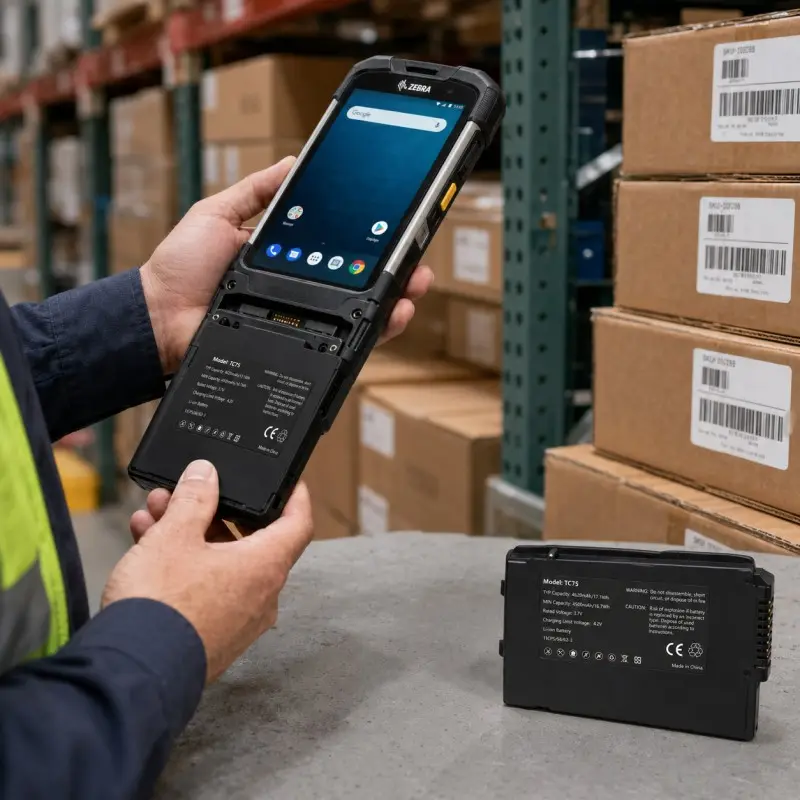
Mobile computers and handheld barcode scanners play an important role in warehouses, retail stores, manufacturing plants, logistics centers, and field-service operations. These devices are frequently used for barcode scanning, inventory updates, order processing, asset tracking, and real-time data collection. However, even a reliable mobile computer cannot perform efficiently when its battery no longer provides enough operating time.
The 82-171249-01 BT-000318 replacement barcode scanner battery is designed for compatible Zebra Symbol TC70, TC72, TC75, TC77, and TC70X mobile computers. It provides a practical replacement option for worn, damaged, or aging batteries and helps restore dependable runtime during demanding daily workflows.
Why a Reliable Mobile Computer Battery Matters
Employees may use handheld terminals continuously throughout an entire shift. In a warehouse, a worker may scan hundreds of products while receiving goods, picking orders, checking stock, or preparing shipments. Retail employees may use the same device for price verification, stock replenishment, and backroom inventory. Field-service teams depend on mobile computers to access job information, record results, and communicate with central systems.
When battery capacity declines, these tasks can be interrupted by unexpected shutdowns or frequent charging. A dependable replacement battery helps the device remain available when employees need it, reducing delays and improving operational continuity.
Maintaining spare batteries can also be useful for companies operating multiple shifts. Instead of removing a device from service while it charges, workers can install a charged backup battery and continue working.
Compatible Zebra Symbol Models
The 82-171249-01 and BT-000318 replacement battery is intended for selected Zebra Symbol mobile computer models, including:
- Zebra Symbol TC70
- Zebra Symbol TC72
- Zebra Symbol TC75
- Zebra Symbol TC77
- Zebra Symbol TC70X
These devices are commonly used in professional environments where durability, mobility, and reliable data collection are important. Although the battery may be listed for several models, buyers should not rely on the device name alone when confirming compatibility.
Before ordering, compare the replacement battery with the original battery installed in the device. Important details include the original part number, rated voltage, capacity, dimensions, contact position, housing structure, polarity, and charging requirements.
Common Signs That the Battery Needs Replacement
Rechargeable batteries naturally lose capacity after repeated use. The process may be gradual, so employees may first notice that the mobile computer no longer lasts through a complete shift.
Typical signs of battery deterioration include:
- Noticeably shorter runtime after charging
- Rapid drops in the battery percentage
- Unexpected device shutdowns
- Frequent charging during normal use
- Incomplete or inconsistent charging
- Excessive heat during operation
- Physical swelling or housing deformation
- Cracks, leakage, or damaged contacts
A swollen, leaking, cracked, or unusually hot battery should be removed from service immediately. Continuing to use a physically damaged battery may affect both the battery and the mobile computer.
Benefits of the 82-171249-01 BT-000318 Replacement Battery
Restored Operating Time
Replacing an aging battery can help restore the practical runtime of Zebra TC-series mobile computers. This allows employees to complete scanning and data-collection tasks with fewer interruptions.
Stable Daily Performance
A compatible battery supplies the power required for barcode scanning, wireless connectivity, screen operation, data processing, and communication with warehouse or business management systems.
Reduced Equipment Downtime
Battery replacement is often faster and more economical than replacing the entire mobile computer. Businesses can continue using existing devices while extending their useful service life.
Convenient Backup Power
Spare batteries can be charged and prepared for busy periods, night shifts, seasonal demand, or remote work locations where charging access may be limited.
Support for Business Maintenance Programs
Companies operating a fleet of mobile computers can include replacement batteries in their equipment maintenance plan. Regular battery inspection and timely replacement help prevent unexpected failures during critical operations.
Main Application Areas
Warehouse and Inventory Management
Zebra mobile computers are frequently used for stock receiving, inventory counting, bin-location checks, order picking, and shipment preparation. Reliable battery power helps workers move through the warehouse without repeatedly returning to a charging station.
Logistics and Distribution
In parcel sorting and distribution centers, handheld terminals support package identification, tracking, routing, and delivery confirmation. Replacement batteries help maintain device availability during high-volume processing periods.
Retail Operations
Retail employees use mobile computers for price checks, product lookup, shelf replenishment, order fulfillment, and stock management. A dependable battery supports efficient front-store and backroom operations.
Manufacturing and Traceability
Manufacturers use barcode terminals to track components, production stages, quality records, and finished goods. Stable mobile power helps maintain accurate traceability across the production process.
Field Service and Transportation
Mobile teams may use Zebra devices to record deliveries, inspect equipment, update service reports, and capture customer signatures. Spare batteries are especially valuable when employees work away from fixed charging facilities.
What to Check Before Purchasing
Compatibility verification is an essential part of choosing a replacement battery. Buyers should confirm the following information:
- Original battery part number
- Compatible device model
- Rated voltage
- Battery capacity
- Battery chemistry
- External dimensions
- Contact and terminal layout
- Polarity
- Housing and locking structure
- Charger and cradle compatibility
For repair companies, distributors, and fleet operators purchasing in bulk, sample testing is recommended before placing a large order. Installing the sample in the actual device allows the buyer to evaluate fit, charging behavior, runtime, and communication with the mobile computer.
Proper Charging and Storage
Correct charging and storage practices can help extend battery service life. Use a compatible charger, charging cradle, or device designed for the battery specification. An unsuitable charger may lead to poor charging performance or battery damage.
Store replacement batteries in a cool, dry, and ventilated location. Keep them away from direct sunlight, water, fire, sharp objects, and excessive heat. Avoid crushing, puncturing, disassembling, or modifying the battery housing.
For batteries stored as backups, periodic inspection and charging may be required. Long-term storage in a fully depleted condition can negatively affect future performance.
Replacement Battery Options for Business Buyers
Battery suppliers can support different requirements for equipment service providers, wholesalers, distributors, and industrial users. Depending on the project, available services may include custom labeling, packaging design, connector verification, sample development, capacity selection, protection-circuit configuration, and bulk production.
Providing the original battery sample, clear product photographs, device model, part number, and electrical specifications can help the supplier confirm the correct solution. This verification is particularly important when one mobile computer series uses different battery versions.
Frequently Asked Questions
Is this battery compatible with every Zebra TC-series device?
No. It is intended for selected TC70, TC72, TC75, TC77, and TC70X configurations. Confirm the original part number and electrical specifications before ordering.
Can it replace both 82-171249-01 and BT-000318 batteries?
It may be used as a replacement when the device, voltage, dimensions, contact layout, and charging system match. Physical and electrical verification is still required.
When should a mobile computer battery be replaced?
Replace it when runtime becomes too short, charging is unreliable, the device shuts down unexpectedly, or the battery shows physical damage.
Can the battery be kept as a spare?
Yes. A charged spare battery can reduce downtime during long shifts or high-volume operations. Store it correctly and inspect it regularly.
What information should bulk buyers provide?
Provide the device model, original battery part number, voltage, capacity, dimensions, photos, required quantity, and any packaging or labeling requirements.
Conclusion
The 82-171249-01 BT-000318 replacement barcode scanner battery offers a practical power solution for compatible Zebra Symbol TC70, TC72, TC75, TC77, and TC70X mobile computers. It can help restore device runtime, reduce charging interruptions, and extend the service life of existing equipment.
Before purchasing, carefully verify the original part number, electrical specifications, dimensions, contacts, and charging compatibility. With the correct battery and proper maintenance, Zebra mobile computers can continue supporting efficient barcode scanning and mobile data collection across demanding business environments.
Talk to the Manufacturer
Resources & Insights
High Capacity Lithium Battery for Wearables: High-Voltage LiPo Cell Design
2026-10-19
Cylindrical Battery Packs for Laptops: 2S vs 3S vs 4S Battery Design
2026-10-19
Stage Lighting Battery Pack: Prevent Voltage Drop & LED Flicker
2026-10-19

Best Rechargeable Batteries for Smart Devices: Performance, Safety, and Selection Guide
2026-10-19


